Just a note for those who face problems on names containing spaces (e.g. "test test.pdf").
In the examples (99% of the time) you can find
header('Content-Disposition: attachment; filename='.basename($file));
but the correct way to set the filename is quoting it (double quote):
header('Content-Disposition: attachment; filename="'.basename($file).'"' );
Some browsers may work without quotation, but for sure not Firefox and as Mozilla explains, the quotation of the filename in the content-disposition is according to the RFC
http://kb.mozillazine.org/Filenames_with_spaces_are_truncated_upon_downloadreadfile
(PHP 4, PHP 5, PHP 7, PHP 8)
readfile — 输出文件
说明
function readfile(string
$filename, bool $use_include_path = false, ?resource $context = null): int|false读取文件并写入到输出缓冲。
参数
filename-
要读取的文件名。
use_include_path-
想要在 include_path 中搜索文件,可使用这个可选的第二个参数,设为
true。 context- 上下文流(context stream) resource。
返回值
成功时返回从文件中读入的字节数, 或者在失败时返回 false
错误/异常
失败时抛出 E_WARNING 警告。
示例
示例 #1 使用 readfile() 强制下载
<?php
$file = 'monkey.gif';

if (file_exists($file)) {
    header('Content-Description: File Transfer');
    header('Content-Type: application/octet-stream');
    header('Content-Disposition: attachment; filename="'.basename($file).'"');
    header('Expires: 0');
    header('Cache-Control: must-revalidate');
    header('Pragma: public');
    header('Content-Length: ' . filesize($file));
    readfile($file);
    exit;
}
?>
以上示例的输出类似于:
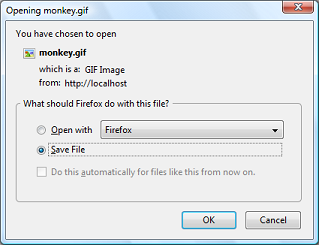
注释
注意:
readfile() 自身不会导致任何内存问题。 如果出现内存不足的错误,使用 ob_get_level() 确保输出缓存已经关闭。
小技巧
如已启用fopen 包装器,在此函数中, URL 可作为文件名。关于如何指定文件名详见 fopen()。各种 wapper 的不同功能请参见 支持的协议和封装协议,注意其用法及其可提供的预定义变量。
参见
- fpassthru() - 输出文件指针处的所有剩余数据
- file() - 把整个文件读入一个数组中
- fopen() - 打开文件或者 URL
- include - include
- require - require
- virtual() - 执行 Apache 子请求
- file_get_contents() - 将整个文件读入一个字符串
- 支持的协议和封装协议
+添加备注
用户贡献的备注 12 notes
riksoft at gmail dot com 
12 years ago
yura_imbp at mail dot ru 
18 years ago
if you need to limit download rate, use this code

<?php
$local_file = 'file.zip';
$download_file = 'name.zip';

// set the download rate limit (=> 20,5 kb/s)
$download_rate = 20.5;
if(file_exists($local_file) && is_file($local_file))
{
    header('Cache-control: private');
    header('Content-Type: application/octet-stream');
    header('Content-Length: '.filesize($local_file));
    header('Content-Disposition: filename='.$download_file);

    flush();
    $file = fopen($local_file, "r");
    while(!feof($file))
    {
        // send the current file part to the browser
        print fread($file, round($download_rate * 1024));
        // flush the content to the browser
        flush();
        // sleep one second
        sleep(1);
    }
    fclose($file);}
else {
    die('Error: The file '.$local_file.' does not exist!');
}

?>
Paulinator 
8 years ago
Always using MIME-Type 'application/octet-stream' is not optimal. Most if not all browsers will simply download files with that type.

If you use proper MIME types (and inline Content-Disposition), browsers will have better default actions for some of them. Eg. in case of images, browsers will display them, which is probably what you'd want.

To deliver the file with the proper MIME type, the easiest way is to use:

header('Content-Type: ' . mime_content_type($file));
header('Content-Disposition: inline; filename="'.basename($file).'"');
Hayley Watson 
18 years ago
To avoid the risk of choosing themselves which files to download by messing with the request and doing things like inserting "../" into the "filename", simply remember that URLs are not file paths, and there's no reason why the mapping between them has to be so literal as "download.php?file=thingy.mpg" resulting in the download of the file "thingy.mpg".

It's your script and you have full control over how it maps file requests to file names, and which requests retrieve which files.

But even then, as ever, never trust ANYTHING in the request. Basic first-day-at-school security principle, that.
TimB 
18 years ago
To anyone that's had problems with Readfile() reading large files into memory the problem is not Readfile() itself, it's because you have output buffering on. Just turn off output buffering immediately before the call to Readfile(). Use something like ob_end_flush().
levhita at gmail dot com 
17 years ago
A note on the smartReadFile function from gaosipov:

Change the indexes on the preg_match matches to:

      $begin = intval($matches[1]);
      if( !empty($matches[2]) ) {
        $end = intval($matches[2]);
      }

Otherwise the $begin would be set to the entire section matched and the $end to what should be the begin.

See preg_match for more details on this.
marro at email dot cz 
18 years ago
My script working correctly on IE6 and Firefox 2 with any typ e of files (I hope :))

function DownloadFile($file) { // $file = include path
        if(file_exists($file)) {
            header('Content-Description: File Transfer');
            header('Content-Type: application/octet-stream');
            header('Content-Disposition: attachment; filename='.basename($file));
            header('Content-Transfer-Encoding: binary');
            header('Expires: 0');
            header('Cache-Control: must-revalidate, post-check=0, pre-check=0');
            header('Pragma: public');
            header('Content-Length: ' . filesize($file));
            ob_clean();
            flush();
            readfile($file);
            exit;
        }

    }

Run on Apache 2 (WIN32) PHP5
flobee at gmail dot com 
21 years ago
regarding php5:
i found out that there is already a disscussion @php-dev  about readfile() and fpassthru() where only exactly 2 MB will be delivered.

so you may use this on php5 to get lager files
<?php
function readfile_chunked($filename,$retbytes=true) {
    $chunksize = 1*(1024*1024); // how many bytes per chunk
    $buffer = '';
    $cnt =0;
    // $handle = fopen($filename, 'rb');
    $handle = fopen($filename, 'rb');
    if ($handle === false) {
        return false;
    }
    while (!feof($handle)) {
        $buffer = fread($handle, $chunksize);
        echo $buffer;
        if ($retbytes) {
            $cnt += strlen($buffer);
        }
    }
        $status = fclose($handle);
    if ($retbytes && $status) {
        return $cnt; // return num. bytes delivered like readfile() does.
    }
    return $status;

}
?>
jorensmerenjanu at gmail dot com 
5 years ago
For anyone having the problem of your html page being outputted in the downloaded file: call the functions ob_clean() and flush() before readfile()
gaosipov at gmail dot com 
17 years ago
Send file with HTTPRange support (partial download):

<?php
function smartReadFile($location, $filename, $mimeType='application/octet-stream')
{ if(!file_exists($location))
  { header ("HTTP/1.0 404 Not Found");
    return;
  }

  $size=filesize($location);
  $time=date('r',filemtime($location));

  $fm=@fopen($location,'rb');
  if(!$fm)
  { header ("HTTP/1.0 505 Internal server error");
    return;
  }

  $begin=0;
  $end=$size;

  if(isset($_SERVER['HTTP_RANGE']))
  { if(preg_match('/bytes=\h*(\d+)-(\d*)[\D.*]?/i', $_SERVER['HTTP_RANGE'], $matches))
    { $begin=intval($matches[0]);
      if(!empty($matches[1]))
        $end=intval($matches[1]);
    }
  }

  if($begin>0||$end<$size)
    header('HTTP/1.0 206 Partial Content');
  else
    header('HTTP/1.0 200 OK');

  header("Content-Type: $mimeType");
  header('Cache-Control: public, must-revalidate, max-age=0');
  header('Pragma: no-cache');
  header('Accept-Ranges: bytes');
  header('Content-Length:'.($end-$begin));
  header("Content-Range: bytes $begin-$end/$size");
  header("Content-Disposition: inline; filename=$filename");
  header("Content-Transfer-Encoding: binary\n");
  header("Last-Modified: $time");
  header('Connection: close');

  $cur=$begin;
  fseek($fm,$begin,0);

  while(!feof($fm)&&$cur<$end&&(connection_status()==0))
  { print fread($fm,min(1024*16,$end-$cur));
    $cur+=1024*16;
  }
}
?>

Usage:

<?php
smartReadFile("/tmp/filename","myfile.mp3","audio/mpeg")
?>

It can be slow for big files to read by fread, but this is a single way to read file in strict bounds. You can modify this and add fpassthru instead of fread and while, but it sends all data from begin --- it would be not fruitful if request is bytes from 100 to 200 from 100mb file.
daren -remove-me- schwenke 
15 years ago
If you are lucky enough to not be on shared hosting and have apache, look at installing mod_xsendfile.
This was the only way I found to both protect and transfer very large files with PHP (gigabytes).
It's also proved to be much faster for basically any file.
Available directives have changed since the other note on this and XSendFileAllowAbove was replaced with XSendFilePath to allow more control over access to files outside of webroot.

Download the source.

Install with: apxs -cia mod_xsendfile.c

Add the appropriate configuration directives to your .htaccess or httpd.conf files:
# Turn it on
XSendFile on
# Whitelist a target directory.
XSendFilePath /tmp/blah

Then to use it in your script:
<?php
$file = '/tmp/blah/foo.iso';
$download_name = basename($file);
if (file_exists($file)) {
    header('Content-Type: application/octet-stream');
    header('Content-Disposition: attachment; filename='.$download_name);
    header('X-Sendfile: '.$file);
    exit;
}
?>
chrisputnam at gmail dot com 
21 years ago
In response to flowbee@gmail.com --

When using the readfile_chunked function noted here with files larger than 10MB or so I am still having memory errors. It's because the writers have left out the all important flush() after each read. So this is the proper chunked readfile (which isn't really readfile at all, and should probably be crossposted to passthru(), fopen(), and popen() just so browsers can find this information):

<?php
function readfile_chunked($filename,$retbytes=true) {
   $chunksize = 1*(1024*1024); // how many bytes per chunk
   $buffer = '';
   $cnt =0;
   // $handle = fopen($filename, 'rb');
   $handle = fopen($filename, 'rb');
   if ($handle === false) {
       return false;
   }
   while (!feof($handle)) {
       $buffer = fread($handle, $chunksize);
       echo $buffer;
       ob_flush();
       flush();
       if ($retbytes) {
           $cnt += strlen($buffer);
       }
   }
       $status = fclose($handle);
   if ($retbytes && $status) {
       return $cnt; // return num. bytes delivered like readfile() does.
   }
   return $status;

}
?>

All I've added is a flush(); after the echo line. Be sure to include this!